Updated September 26, 2026 · By Soren Starck, who makes TurtleBar
Mac Battery Menu Bar App: See Time Left, Not Just a Percentage
macOS can only put a percentage in the menu bar; Apple removed the time-remaining estimate in 2016. To get time left back, you need a menu bar app. TurtleBar ($4.99 once) shows a countdown like "3h 42m", or the clock time your battery will be empty, and acts on it by switching Low Power Mode on before you run short. If you only want a free readout, Stats can show macOS's own raw estimate next to its battery icon.
What it looks like
Five ways TurtleBar can show your battery in the menu bar
By default the label is drawn inside a battery icon. You can move it beside the icon, fill the icon to the charge level, and colour the label when time is getting short.
- Time remaining
A countdown. The default, and the one most people keep.
Beside the icon: 3h 42m
- Empty at
The clock time the battery will run out, rounded to five minutes.
Beside the icon: 5:40 PM
- Time and percentage
Both at once, for people who still like the number.
Beside the icon: 3h 42m · 54%
- Percentage
Just the charge, like macOS, with everything else one click away.
Beside the icon: 54%
- Icon only
The smallest footprint in a crowded menu bar.
Beside the icon: No label
- While charging
Every mode flips to full instead of empty: "48m to full" or "Full at 6:25 PM".
It also shows the rate it's charging at.
One-time purchase · no subscription · 14-day refund · macOS 13 Ventura or later
Why the number in your menu bar has to be steady
Apple dropped its menu bar estimate in 2016, saying it varied too much with how the Mac was used. A raw estimate follows every spike in load: open a heavy page and it can fall by hours, close it and it bounces back. A time-left figure is only useful if you can plan around it.
TurtleBar's estimate reads the battery's actual power draw in watts and smooths it, so one heavy page doesn't swing it. When your workload really changes, such as a video call starting, it catches up within about a minute and says "Adjusting" while it does. It also learns what your Mac draws at each hour of the day, so the estimate gets more accurate over the first few days, and it shows a ~ while it isn't confident yet instead of pretending to be precise.
One click away: the popover
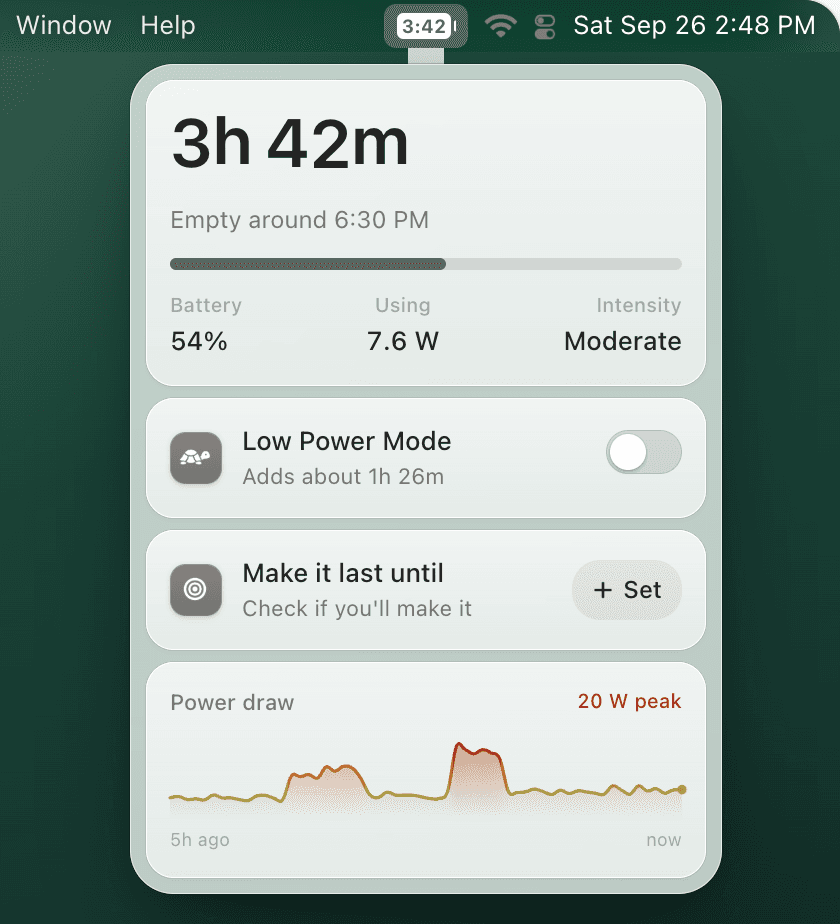
- Time left and "Empty around 5:40 PM", with the battery percentage, the current draw in watts and how intense your workload is.
- A Low Power Mode switch that tells you what it's worth before you flip it: "Adds about 1h 10m", for example.
- "Make it last until 6:00 PM", with a verdict: "On track · 45m to spare", "Close", or "Short by about 30m · Low Power Mode would cover it", and a one-click fix.
- Five hours of history: a power draw chart and a battery level chart, with charging stretches marked.
- The five apps using the most power, in watts and in how much runtime they cost you.
Warnings that come from the menu bar
TurtleBar warns you when there's about 1 hour remaining (you can change the threshold), and when your Mac may not last until the time you set, with a Turn On Low Power Mode button right in the notification. Each warning comes at most once per stretch on battery, and only when the estimate is confident, so it doesn't nag.
Menu bar battery apps compared
| What you want | macOS | Stats (free) | TurtleBar |
|---|---|---|---|
| Percentage in the menu bar | Yes | Yes | Yes |
| Time left in the menu bar | No, removed in 2016 | Yes, macOS's raw estimate | Yes, smoothed and learned from your usage |
| Clock time it will be empty | No | No | Yes |
| Warning before empty | When the percentage gets low | At a battery level you set | About an hour before empty, or when a target time is at risk |
| Low Power Mode, automatically | Always, never, or whenever on battery | No | By charge, runtime, target time, idle time or app |
| Which apps cost you | Energy Impact, in Activity Monitor | Top processes, in its popup | Top five, in watts and in runtime |
| Price | Free | Free, open source | $4.99 once |
Stats checked in its open-source code on September 26, 2026.
Other apps put battery information in the menu bar too, for different jobs. iStat Menus (paid) has a configurable battery item that changes when you're draining, charging or full, plus Bluetooth device batteries, inside a full system monitor. coconutBattery (free) adds a menu bar item with battery details, alongside its health readings. AlDente (free, with a paid Pro) lives in the menu bar to control charge limits. The best Mac battery apps comparison covers all of them.
Swap "54%" for "3h 42m"
Install it, pick a display mode, and the menu bar shows time instead of a percentage. It shows a ~ while it's still learning your Mac, and gets sharper over the first few days.
When the macOS percentage is enough
If all you need is the charge level, you don't need an app. Open System Settings → Control Center, find Battery, and turn on Show Percentage. Full steps: how to show battery percentage on Mac. Prefer a widget? See MacBook battery widgets.
The limit is that a percentage isn't time. The same 35% can be an hour on a video call or three hours of writing, and the menu bar can't tell you which.
Small, private, and asks once
- About 7 MB, universal for Apple Silicon and Intel, macOS 13 Ventura or later.
- Signed and notarized by Apple.
- Asks for administrator permission once, only to switch Low Power Mode. You can revoke it in Settings.
- Battery data never leaves your Mac. TurtleBar goes online only to check your license and for updates.
- Made by one indie developer, Soren Starck. $4.99 once, with a 14-day refund.
Frequently asked questions
What is the best Mac battery menu bar app?
If a percentage is all you want, macOS does it for free. If you want to see how long the battery will last, TurtleBar shows a countdown like 3h 42m or the clock time it will be empty, and can turn on Low Power Mode when you would run short. It costs $4.99 once. Stats is the free option if you only need macOS's raw estimate.
Can macOS show battery time remaining in the menu bar?
No. Apple removed the time-remaining estimate from the menu bar in 2016. macOS can show the percentage next to the battery icon, and Terminal's pmset -g batt prints a one-off estimate, but nothing stays in the menu bar.
Is there a free menu bar app that shows battery time remaining?
Yes. Stats, a free open-source system monitor, can show the time remaining next to its battery icon. It displays the estimate macOS calculates, the same one pmset -g batt prints, which moves with every change in load. TurtleBar smooths and learns its estimate and adds Low Power Mode automation.
How accurate is TurtleBar's time estimate?
It reads the battery's actual power draw in watts, smooths it so one heavy web page doesn't swing it, and catches up within about a minute when your workload really changes, saying Adjusting while it does. It learns what your Mac draws at each hour of the day, so it gets more accurate over the first few days, and shows a ~ while it isn't confident yet.
Can TurtleBar show the time my Mac will run out instead of a countdown?
Yes. Choose Empty at and the menu bar shows the clock time the battery will be empty, rounded to five minutes. You can also show time and percentage together, only the percentage, or only the icon, inside a battery icon or as plain text.
Do I need a battery menu bar app if macOS already shows the percentage?
Not if a rough charge level is enough. A menu bar app is worth it when you want hours and minutes instead of a percentage, a warning before you run short, or Low Power Mode switched on for you.
Related guides
- How to see battery time remaining on Mac
- Why Apple removed battery time remaining
- Best Mac battery apps compared
- Battery app for MacBook Air, Pro and Neo
- MacBook low battery alerts
Put time back in your menu bar
A countdown or an empty-at time, a check that you'll make it, and Low Power Mode when you won't. $4.99 once.
"Clean, useful, no fluff. Exactly my kind of Mac utility."