Updated September 26, 2026 · By Soren Starck
Best Mac Battery Apps for MacBook in 2026
The best Mac battery app is the one that does the job you actually have. "Battery app" covers four different jobs: knowing how long the battery will last, checking its health, limiting how far it charges, and monitoring the whole system. No single app does all four well, so here is the best pick for each, what it costs, and what it can't do.
Quick answer
The best Mac battery app for each job
Best for time left and saving battery
TurtleBar · $4.99 once
Shows how long your MacBook will last in the menu bar and turns on Low Power Mode when you would run short.
Best for battery health
coconutBattery · Free, Plus is a one-time purchase
Capacity against design capacity, cycle count and a saved history, for Mac, iPhone and iPad.
Best charge limiter
AlDente · Free, Pro is yearly or lifetime
Stops charging at the level you choose, with extras like heat protection. On Apple silicon with macOS Tahoe 26.4 or later, macOS's own Charge Limit covers the basics.
Best full system monitor
iStat Menus · Paid, 14-day free trial
CPU, GPU, memory, disks, network, sensors and battery, including Bluetooth device batteries.
Best free battery monitor
Stats · Free and open source
A menu bar monitor whose battery module shows health, cycles, temperature, watts and macOS's time estimate.
Already on your Mac for free: battery percentage, Battery Health and cycle count. Where to find them.
One-time purchase · no subscription · 14-day refund · macOS 13 Ventura or later
A note on bias: I make TurtleBar, so weigh that pick accordingly. It is listed first because it is the only app here built around runtime. Every other app's features, prices and requirements were checked on its developer's own site on September 26, 2026, and where another app is the better fit, this page says so.
The four jobs a Mac battery app can do
Mac battery apps compared
| App | Best at | In the menu bar | Price | Requires |
|---|---|---|---|---|
| TurtleBar | Time left, and switching Low Power Mode on before you run short | Countdown, clock time it will be empty, time and %, or % inside a battery icon | $4.99 once | macOS 13 Ventura or later, Apple Silicon or Intel |
| coconutBattery | Battery health: capacity vs design, cycle count, saved history; iPhone and iPad too | Battery details | Free; Plus is a one-time purchase | macOS 12 Monterey or later |
| AlDente | Charge limiting, plus heat protection, sailing mode and calibration mode | Customisable icon and popup | Free; Pro is a yearly or lifetime license | macOS 12 Monterey to macOS 26 Tahoe, Apple Silicon or Intel |
| iStat Menus | Everything: CPU, GPU, memory, disks, network, sensors, battery, Bluetooth device batteries | Highly configurable, one item per module | Paid; 14-day free trial | macOS 11 or later |
| Stats | Free system monitor with a detailed battery module | Battery level, with optional time left from macOS | Free, open source (MIT) | macOS 12 Monterey or later |
| macOS built in | Percentage, Battery Health, cycle count, Low Power Mode, Optimized Battery Charging, and a Charge Limit on Apple silicon with Tahoe 26.4+ | Percentage only | Free | Already on your Mac |
Checked on each developer's site on September 26, 2026. Prices change and vary by country, so confirm on the developer's page before you buy.
If your question is "how long do I have?", that's TurtleBar's whole job.
Health apps tell you how worn the battery is. Charge limiters look after it while it's plugged in. TurtleBar is for the hours after you unplug: time left in the menu bar, a check that you'll make it to the time you need, and Low Power Mode switched on for you when you won't.
1. TurtleBar: best for time left and saving battery
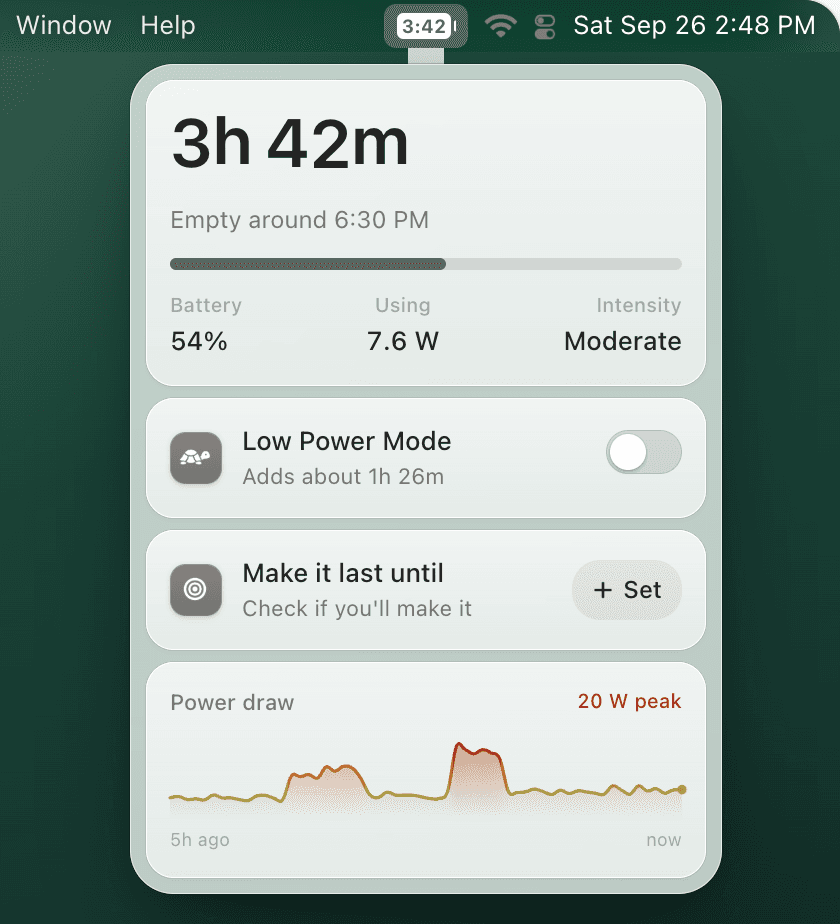
TurtleBar answers the question the battery percentage can't: how long you have. The menu bar shows a countdown like "3h 42m", the clock time the battery will be empty, time and percentage, or just the percentage, drawn inside a battery icon by default.
The estimate reads the battery's actual power draw in watts and smooths it, so one heavy web page doesn't swing it. When your workload really changes, it catches up within about a minute and says "Adjusting" while it does. It also learns what your Mac draws at each hour of the day, so it gets more accurate over the first few days, and shows a ~ while it isn't confident yet.
The part that saves battery is the automation. TurtleBar can turn Low Power Mode on when the charge drops below a level you pick, when runtime drops below a limit, when your Mac won't reach a target time, after a few idle minutes, or when you open specific apps. It skips the rule while the charge is above 80% (adjustable), turns Low Power Mode back off when you plug in, never undoes a change you made yourself, and every automatic change says why. The popover also shows what Low Power Mode would add ("Adds about 1h 10m", for example) and the five apps using the most power, in watts and in runtime.
- Best for: anyone who works unplugged: students, commuters, people on back-to-back calls.
- Not for: battery health, cycle counts, charge limiting, temperature or Bluetooth device batteries. It doesn't do those; use the apps below.
- Details: $4.99 once, no subscription, 14-day refund. macOS 13 Ventura or later, universal for Apple Silicon and Intel, about 7 MB, signed and notarized by Apple. Battery data never leaves your Mac.
2. coconutBattery: best battery health app for MacBook Pro and Air
If you searched for a battery health app, this is the one to install. coconutBattery shows your battery's current capacity next to its design capacity, the cycle count and other live details, and it can save readings so you can watch wear over months. It reads iPhone and iPad batteries too, over USB in the free version.
The free version covers the Mac and iPhone/iPad diagnostics, saved health readings and a menu bar item. coconutBattery Plus, a one-time purchase, adds Wi-Fi reading of iOS devices, a battery lifetime analyzer with temperature and voltage data, and threshold notifications. It needs macOS 12 Monterey or later.
- Best for: tracking wear over time, or checking a used MacBook before you buy it.
- Not for: today's runtime. It reports on the battery; it doesn't change how your Mac uses power.
More: TurtleBar vs coconutBattery and what a normal cycle count is.
3. AlDente: best charge limiter
First, check whether you need it. Since macOS Tahoe 26.4, Apple silicon Macs have a built-in Charge Limit between 80% and 100%: System Settings → Battery, then the info button next to Charging. If a simple cap is all you want, that's free and already there.
AlDente goes further. It stops your MacBook charging at a level you choose, so a Mac that lives on a desk doesn't sit at 100% all day, and it also offers heat protection, sailing mode, calibration mode, a top-up option and Apple Shortcuts support. There is a free version; AlDente Pro is sold as a yearly subscription or a lifetime license, and through Setapp. The developer lists macOS 12 Monterey through macOS 26 Tahoe, on Intel MacBooks from 2013 as well as Apple silicon, so it also covers Macs that can't use Apple's Charge Limit.
- Best for: a MacBook that is plugged in most of the day, when you want more than a simple cap, or an Intel Mac.
- Not for: making today's charge last longer. A limit means less charge when you unplug, which is the opposite of what you want before a flight.
More: TurtleBar vs AlDente and AlDente alternatives.
4. iStat Menus: best full system monitor
iStat Menus puts CPU, GPU, memory, disks, network, sensors (temperatures, fans, voltages), weather and battery in your menu bar. Its battery module shows detailed battery state, a menu item that changes when you're draining, charging or full, and the battery levels of AirPods, Magic Mouse, Magic Trackpad and other Bluetooth devices. It's paid, with a 14-day free trial, and needs macOS 11 or later.
- Best for: power users who want every number about their Mac in one place.
- Not for: someone who only cares about the battery. It shows you the data; the decisions stay yours.
More: TurtleBar vs iStat Menus.
5. Stats: best free battery monitor
Stats is a free, open-source (MIT) menu bar monitor for macOS 12 Monterey or later. Its battery module can show the level in the menu bar with the time remaining next to it, and its popup lists health, cycle count, battery temperature, power in watts, the top processes and time to charge or discharge. It can notify you at a low or high battery level. It also monitors CPU, GPU, memory, disks, network, sensors and Bluetooth devices.
- Best for: a free coconutBattery or iStat Menus alternative.
- Not for: automation. The time it shows is the raw estimate macOS itself calculates, the same one Terminal's
pmset -g battprints.
6. Battery Toolkit: archived, so look elsewhere
Battery Toolkit is a free, open-source charge limiter for Apple Silicon Macs only. It can hold the charge between limits you set and cut power from the adapter. Its GitHub repository is now archived and read-only, so it won't get fixes for future macOS versions. If you're looking for a Battery Toolkit alternative, you're on Apple silicon, so the simplest one is free: update to macOS Tahoe 26.4 or later and use the built-in Charge Limit. AlDente is the best-known maintained app if you want more control.
macOS built in: what you already have for free
- Battery percentage: System Settings → Control Center → Battery → Show Percentage.
- Battery Health: System Settings → Battery, then the info button next to Battery Health.
- Cycle count: hold Option, open the Apple menu → System Information → Power.
- Charge Limit: System Settings → Battery, then the info button next to Charging. Apple silicon with macOS Tahoe 26.4 or later, 80% to 100%.
- Low Power Mode: in Battery settings, always on, off, or on whenever you're on battery.
- Which apps use energy: Activity Monitor → Energy tab.
- A time estimate: only in Terminal, with
pmset -g batt. Apple removed it from the menu bar in macOS 10.12.2, in December 2016.
If that's all you need, you don't need an app at all. The best free Mac battery apps guide goes further, and why Apple removed battery time remaining explains the gap.
Is there a MacBook battery test app?
"Testing" a MacBook battery means one of two things. A health test is maximum capacity and cycle count: coconutBattery, Stats or macOS's own Battery Health will tell you in seconds, and our battery capacity guide explains what the numbers mean. A runtime test is how long it lasts doing your real work: TurtleBar shows the actual draw in watts, the time left, and five-hour charts of power draw and battery level, so you can see which part of your day costs the most.
Which one should you install?
- You work unplugged and want to know if you'll make it: TurtleBar.
- You want to know how worn your battery is: coconutBattery, or macOS for free.
- Your MacBook stays plugged in at a desk: macOS's Charge Limit on Apple silicon with Tahoe 26.4 or later, or AlDente for more control.
- You want every stat about your Mac: iStat Menus, or Stats for free.
- More than one of the above: combine them. TurtleBar alongside coconutBattery or AlDente works because each does a different job.
Choosing for a specific model? See the right battery app for MacBook Air, Pro and Neo. Mainly want your battery to last longer? See MacBook battery saver apps that actually save power.
Frequently asked questions
What is the best Mac battery app in 2026?
It depends on the job. For knowing how long your MacBook will last and having Low Power Mode switched on for you, TurtleBar ($4.99 once). For battery health and cycle count, coconutBattery (free, with a paid Plus version). For a charge limit, the Charge Limit built into macOS Tahoe 26.4 or later on Apple silicon, or AlDente (free, with a paid Pro version) for more control. For a full system monitor, iStat Menus (paid) or Stats (free and open source).
What is the best battery health app for MacBook Pro?
coconutBattery is the usual pick: it compares current capacity with design capacity, shows the cycle count and can save a health history, and its free version covers those basics. macOS shows the core numbers for free too: Battery Health in System Settings and the cycle count in System Information. TurtleBar does not measure battery health.
Is there a good free Mac battery app?
Yes. macOS itself covers percentage, Battery Health and cycle count. On Apple silicon with macOS Tahoe 26.4 or later it also has a Charge Limit. coconutBattery's free version adds a health history, AlDente's free version limits charging, and Stats is a free open-source monitor that can show macOS's own time estimate in the menu bar. None of them is built to switch Low Power Mode by remaining runtime or a target time, which is what TurtleBar is for.
Which Mac battery app shows time remaining in the menu bar?
TurtleBar shows it as a countdown (3h 42m), as the clock time the battery will be empty, or inside a battery icon, using an estimate that is smoothed and learns how your Mac is used. Stats, a free open-source monitor, can show the raw estimate macOS calculates. macOS itself removed the estimate from the menu bar in 2016.
What is a good coconutBattery alternative?
For health data, the free alternatives are macOS itself (System Settings and System Information) and Stats, which shows health, cycle count and battery temperature. iStat Menus is the paid all-in-one option. If what you actually wanted was to know how long the battery will last today, that is a different job, and TurtleBar is built for it.
What can I use instead of Battery Toolkit?
Battery Toolkit, a free open-source charge limiter for Apple Silicon Macs, is archived on GitHub, so it no longer gets updates. Because it only ran on Apple silicon, the simplest replacement is the Charge Limit built into macOS Tahoe 26.4 or later (System Settings, Battery, the info button next to Charging). AlDente is the best-known maintained app if you want more control. Run only one charge limiter at a time.
Can I use more than one battery app at once?
Yes, when they do different jobs. TurtleBar can run next to coconutBattery or AlDente because it handles runtime and Low Power Mode, while they handle health or charging. Avoid running two apps that both control charging.
Is a paid Mac battery app worth it?
Only if it does something for you that free tools don't. If a percentage and an occasional health check are enough, stay free. If you want a steady time-left estimate and Low Power Mode switched on before you run short, TurtleBar is $4.99 once, with no subscription and a 14-day refund.
Related guides:
Know how long you have, not just the percentage
Time left in the menu bar, a check that you'll make it, and Low Power Mode switched on when you won't. $4.99 once, 14-day refund.
"Clean, useful, no fluff. Exactly my kind of Mac utility."