Updated September 26, 2026 · By Soren Starck
How to Turn On Low Power Mode Automatically on Mac
System Settings can't turn on Low Power Mode at a battery percentage: its options are Always, Only on Battery and Only on Power Adapter. To add a trigger such as "below 30%", either build a Shortcuts automation with the Battery Level trigger on macOS Tahoe 26 or later, or use a menu bar app like TurtleBar that has the rule built in.
Two ways to automate it
- Shortcuts automation: free, macOS Tahoe 26 or later, about ten minutes of setup with a shell script. Percentage triggers only. Steps below.
- TurtleBar: $4.99 once, macOS 13 Ventura or later, one setting. Triggers on battery %, time left, a target time, idle time or apps, and switches back when you charge.
What macOS can do on its own
The closest built-in option is Only on Battery in System Settings > Battery. It turns Low Power Mode on the moment you unplug and off when you plug in. That is automatic, but blunt: your Mac runs slower from 100%, when there is no need to save anything yet, and nothing changes when you're about to run out. If Only on Battery is all you need, the Low Power Mode guide covers every setting.
Method 1: a Shortcuts automation (macOS Tahoe 26 or later)
macOS Tahoe brought iPhone-style automations to Shortcuts on Mac, including a Battery Level trigger. There is no built-in Low Power Mode action on Mac that we could find, so the automation runs the pmset command instead.
- Allow scripts. Open the Shortcuts app, choose Shortcuts > Settings, click Advanced and turn on Allow Running Scripts.
- Create an automation. Click Automation in the sidebar, then click the + button to add a new automation.
- Choose the Battery Level trigger. Choose Battery Level, set it to Falls Below 30%, and choose Run Immediately.
- Add the Low Power Mode command. Add a Run Shell Script action, enter pmset -a lowpowermode 1, and turn on Run as Administrator in the action's options.
- Add the off switch. Create a second automation with the Charger trigger set to Is Connected, running pmset -a lowpowermode 0 the same way, so Low Power Mode turns off when you plug in.
- Test it. Run each shortcut once by hand, then watch the first real trigger before relying on it.
# Battery Level falls below 30%  (Run as Administrator on)
pmset -a lowpowermode 1

# Charger is connected  (Run as Administrator on)
pmset -a lowpowermode 0
Know the limits before you rely on it
- Running a command as administrator can make macOS ask for your password, so the automation may stop and wait for you.
- It only knows percentages. It can't react to how much time is left or to a deadline, and 30% means very different things on different days.
- Some Mac users report Battery Level automations that don't always fire. Test yours on an ordinary day before counting on it for a flight.
- It doesn't know about changes you make by hand, and it can't tell you why Low Power Mode is on.
Method 2: TurtleBar (macOS 13 Ventura or later)
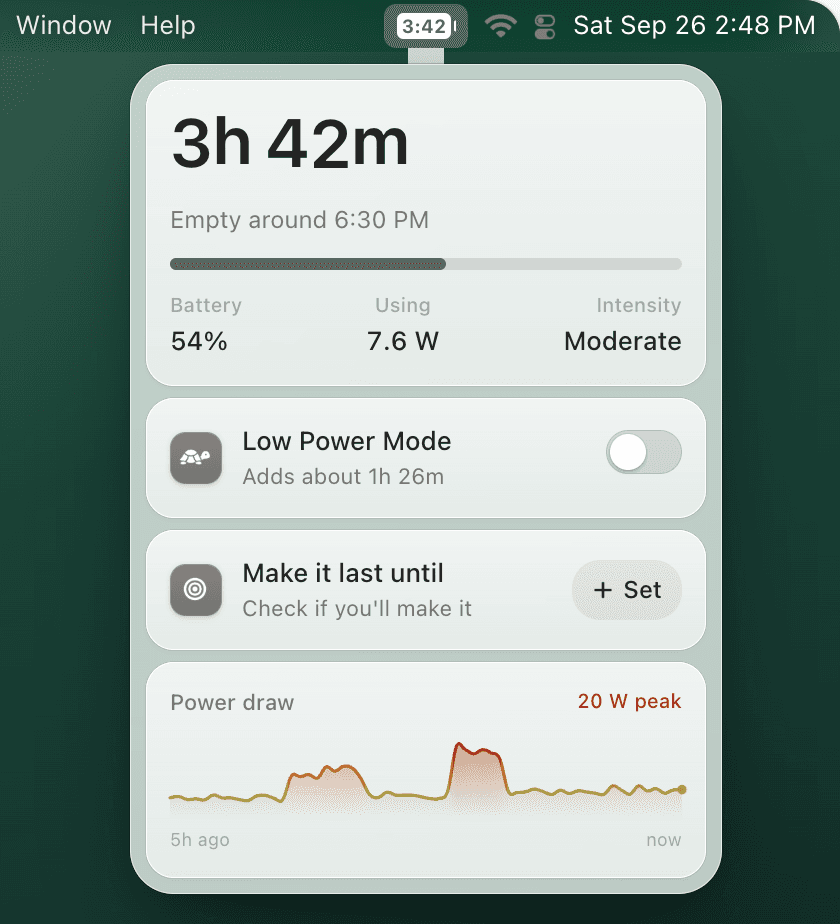
TurtleBar is a menu bar app that shows battery time remaining and switches Low Power Mode for you. Turn on the rules you want, approve administrator permission once, and it handles the rest. Rules can switch Low Power Mode on:
- Below a battery level, such as 30%.
- When time left drops below a runtime, such as 1 hour.
- When your Mac won't make it to a target time, such as the end of a flight or a class.
- After a number of minutes idle.
- When chosen apps are open, with a second list of apps that turn it off.
Guards keep it from getting in the way: it can skip the rules while the charge is still above 80%, turn Low Power Mode back off when you start charging, and it never undoes a change you made yourself. Every automatic switch comes with the reason, so you're never left wondering why your Mac feels slower. Your data stays on your Mac.
Shortcuts vs TurtleBar
| Shortcuts automation | TurtleBar | |
|---|---|---|
| Price | Free | $4.99 once |
| macOS version | Tahoe 26 or later | Ventura 13 or later |
| Turn on below a battery % | Yes | Yes |
| Turn on when time left runs low | No | Yes |
| Turn on if you won't reach a set time | No | Yes |
| Turn on after minutes idle | No | Yes |
| Per-app rules | One automation per app | Apps that turn it on, apps that turn it off |
| Turn off when charging | A second automation | Built in |
| Skip while the charge is still high | Extra If logic | Built in (default above 80%) |
| Administrator password | Can be asked when it runs | Once, at setup |
| Respects a change you made yourself | No | Yes, never undoes it |
| Tells you why it switched | No | Yes, every time |
If a percentage rule is all you need and you're on macOS Tahoe, Shortcuts is a fine free option. If you want it to react to time left, or you'd rather not maintain scripts, TurtleBar does it in one setting.
Which rule should turn on Low Power Mode?
| Rule | Best for | Why it works |
|---|---|---|
| Below 30% | Normal days | Full speed most of the day, a safety net before the warning. |
| Below 40% | Travel, classes, conferences | Starts early enough to add real time to the rest of the day. |
| Less than 1 hour left | Days with mixed work | Reacts to what you're doing, not to a percentage. |
| Won't last until 6 PM | A flight, a shift, an exam | Only slows the Mac if you would actually run out. |
| Zoom, Teams or Meet open | Video calls on battery | Long, steady drain where savings add up. |
Recommended setup
Start with 30%, then adjust after a week.
If you still have plenty of time left when it kicks in, lower it to 20%. If you often finish the day near empty, raise it to 40%, or switch to a "less than 1 hour left" rule so it follows your workload. Switching on earlier always buys more time: the savings table shows why.
Frequently asked questions
Can macOS turn on Low Power Mode automatically at a battery percentage?
Not from System Settings, which only offers Always, Only on Battery and Only on Power Adapter. On macOS Tahoe 26 or later, a Shortcuts automation with the Battery Level trigger can run pmset to do it. TurtleBar adds the rule without scripts and works on macOS 13 Ventura or later.
Does Shortcuts on Mac have a battery level trigger?
Yes, from macOS Tahoe 26. In the Automation section of the Shortcuts app, Battery Level can run a shortcut when the charge reaches, rises above or falls below a percentage. Earlier macOS versions have no Shortcuts automations on Mac.
Is there a Set Low Power Mode action in Shortcuts on Mac?
We couldn't find one as of September 2026, although Shortcuts on iPhone has it. On Mac, use a Run Shell Script action with pmset -a lowpowermode 1 and Run as Administrator turned on.
What battery percentage should trigger Low Power Mode?
30% for a normal day and 40% for a travel day are good starting points. Earlier is better, because Low Power Mode stretches whatever charge is left: switching it on at 50% adds roughly two and a half times as much time as switching it on at 20%.
Can Low Power Mode turn off automatically when I plug in?
Yes. The built-in Only on Battery setting does this. With Shortcuts, add a Charger automation that runs pmset -a lowpowermode 0. TurtleBar can turn it back off when you start charging.
Can Low Power Mode turn on for specific apps like Zoom?
macOS has no per-app setting. Shortcuts on macOS Tahoe can run a script when an app opens or closes, one automation per app. TurtleBar keeps a list of apps that turn Low Power Mode on and apps that turn it off.
Why trigger on time left instead of a percentage?
Because 30% can mean nearly four hours of writing or about thirty-five minutes of video export on a 13-inch MacBook Air. A rule like turn on when less than 1 hour is left, or when I won't make it to 6 PM, reacts to what you're actually doing.