Updated September 26, 2026 · By Soren Starck
Why Apple Removed Battery Time Remaining from the Mac (and How to Get It Back)
Apple removed the time remaining estimate from the Mac battery menu in macOS Sierra 10.12.2, released on December 13, 2016. Apple said the percentage was accurate, but the time estimate couldn't keep up with how quickly usage changes, which made it confusing. macOS still calculates it: Terminal and Activity Monitor show it, and menu bar apps can display it again.
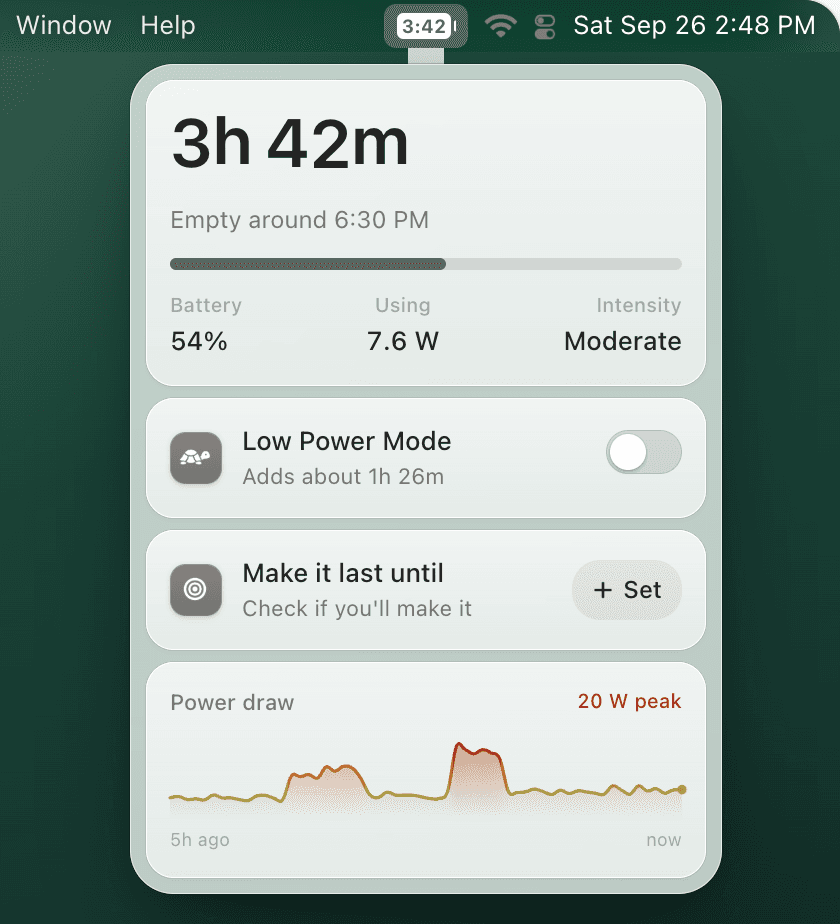
Just want it back? TurtleBar puts time remaining in your menu bar, with an estimate that doesn't jump every time you open an app. $4.99 once.
What the Mac battery menu used to show
Before December 2016, clicking the battery icon in the menu bar showed:
- The battery percentage, such as 72%
- A time estimate, such as "4:32 Remaining", or time until full while charging
- The power source: Battery or Power Adapter
- Apps using significant energy
Everything on that list is still there today except the time. For anyone deciding whether to start a video call or look for a charger, the time was the useful part: "4 and a half hours, I can make it through this flight" is a decision; "72%" is a puzzle.
Timeline: how the estimate disappeared
October 27, 2016
Apple announces the redesigned MacBook Pro with Touch Bar, rated at up to 10 hours of battery life.
November to December 2016
Early owners report battery life well short of that, some as low as 3 hours.
December 13, 2016
macOS Sierra 10.12.2 ships. The battery menu now shows only the percentage; the time estimate is gone.
Late December 2016
Consumer Reports declines to recommend the new MacBook Pro because its battery results vary widely from test to test.
January 2017
Apple traces those results to a Safari bug triggered by a developer setting used in the tests. Consumer Reports retests on the fixed software and recommends the MacBook Pro.
What Apple said
Apple explained the change to The Loop, which reported that Apple said the percentage is accurate, but:
"because of the dynamic ways we use the computer, the time remaining indicator couldn't accurately keep up with what users were doing. Everything we do on the MacBook affects battery life in different ways and not having an accurate indicator is confusing."
Apple also pointed to background activity that users may not be aware of, which moves battery life without anything visible changing on screen.
Why many users didn't buy it
The timing looked bad. The feature that made battery life easiest to measure disappeared in the same weeks that new MacBook Pro owners were complaining about battery life. Apple never linked the two, and the Consumer Reports results that followed turned out to involve a Safari bug. But to many people it looked like hiding a number instead of fixing it, and that reading stuck.
Was Apple right to remove it?
Half right. A time estimate built from a single moment of use is misleading: sit idle and it promises 12 hours, start a video call and it drops to 3 within a minute. That really is confusing.
But the answer to a jumpy estimate is a steadier one, not none at all. A car's range estimate also varies with how you drive, and carmakers improved the math rather than removing the gauge. A percentage tells you how full the tank is. It can't tell you how far you'll get, because that depends on what you're doing.
Why it still hasn't come back
As of September 2026, almost ten years later, the battery menu still shows only a percentage, in every macOS version since Sierra. Apple hasn't said why it has stayed away. The likely reasons are guesses, but reasonable ones:
- Simplicity: a percentage never jumps, so it never looks wrong.
- Fewer complaints: a falling estimate reads like a failing battery, even when it is only reacting to a new app.
- Longer battery life: Apple Silicon MacBooks last far longer than the 2016 models, so fewer people run out.
- Priorities: it may simply never have made the list again.
How to get battery time remaining back
The estimate was only removed from the menu. macOS still calculates it, so there are three ways to see it:
- Terminal: run
pmset -g batt. The line ends with something like "3:42 remaining". - Activity Monitor: click the Energy tab and read Time remaining at the bottom of the window.
- A menu bar app: TurtleBar shows the time left next to your battery icon all the time.
The battery time remaining guide walks through each method, explains time remaining vs time on battery, and shows how long 20%, 30% or 40% really lasts.
The fix for Apple's objection
An estimate that follows what you do, without jumping around.
- Reads your Mac's real power draw in watts and smooths out short spikes
- Adjusts within about a minute when your workload really changes, and says "Adjusting" while it does
- Learns how much this Mac draws hour by hour, and marks the time with ~ when it isn't sure yet
- Shows "3h 42m" or the clock time it will be empty, right in the menu bar
One-time purchase · no subscription · 14-day refund · macOS 13 Ventura or later
Does the time still matter with Apple Silicon?
For people who charge every night and rarely go below 50%, not much. For students in all-day lectures, people working from cafés, travelers on long flights and anyone who regularly runs the battery down, it matters more than ever, because a modern MacBook's runtime swings so widely: on a 13-inch MacBook Air, the same 54% can mean about 7 hours of writing or about 1 hour of video export. "3 hours 12 minutes" answers the question. "47%" doesn't.
Frequently asked questions
When did Apple remove battery time remaining from the Mac?
In macOS Sierra 10.12.2, released on December 13, 2016. Before that update, clicking the battery icon in the menu bar showed an estimate such as 4:32 remaining.
Why did Apple remove battery time remaining?
Apple said the battery percentage was accurate, but that because of the dynamic ways people use their Macs, the time estimate couldn't keep up with what they were doing, and an inaccurate estimate was confusing.
Was it removed because of the MacBook Pro battery complaints?
Apple never said so. The removal came in the same weeks as complaints about the 2016 MacBook Pro's battery life, which is why many people saw a link, but the reason Apple gave was accuracy.
Will Apple bring back battery time remaining?
There is no sign of it. As of September 2026, almost ten years after the change, the Mac battery menu still shows only a percentage.
Can I still see battery time remaining on a Mac?
Yes. Run pmset -g batt in Terminal, or open Activity Monitor, click Energy and read Time remaining at the bottom. For a live readout in the menu bar, use an app such as TurtleBar.
Related guides:
Get battery time remaining back
Apple removed it in 2016. TurtleBar puts it back in your menu bar. $4.99 once, 14-day refund.