MacBook Neo
MacBook Neo battery: life, cycle count and health
The MacBook Neo has a 36.5 Wh battery rated for 1,000 charge cycles. Apple quotes up to 11 hours of web browsing and up to 16 hours of video streaming. That battery is about 30% smaller than a 13-inch MacBook Air's, so what you do with it decides how long it lasts more than the percentage does.
| Battery | 36.5 Wh lithium-ion |
|---|---|
| Rated cycles | 1,000 |
| Apple's battery life claim | Up to 11 h web browsing, up to 16 h video streaming |
| Chip and display | A18 Pro, 13-inch Liquid Retina |
| Released | March 2026 |
What is a good cycle count for a MacBook Neo?
Apple designs the MacBook Neo battery to keep up to 80% of its original capacity at 1,000 cycles. One cycle is 100% of the battery used, so two days at 50% make one cycle. As a rule of thumb:
- Under 300 cycles: a young battery. Capacity should read 95% or more.
- 300 to 700 cycles: normal wear. Capacity in the high 80s or low 90s is typical.
- 700 to 1,000 cycles: watch Maximum Capacity, especially if the Mac no longer lasts your day.
- Over 1,000 cycles or below 80% capacity: plan a replacement, particularly if macOS shows "Service Recommended".
How to check battery health and cycle count
- Health: System Settings > Battery, then the info button next to Battery Health. It shows the condition and Maximum Capacity.
- Cycle count: hold Option, open the Apple menu > System Information, then Power. Look for Cycle Count under Health Information.
More on reading these numbers in the MacBook battery health guide and the cycle count guide.
How long does a MacBook Neo battery last?
Estimated time left at each charge, for a healthy battery at a comfortable brightness. Apple's figures come from lab tests; these are everyday numbers, so they are lower.
| Battery | Writing, notes, email | Web browsing | Streaming video | Video calls | Coding and builds |
|---|---|---|---|---|---|
| 100% | 10h 59m | 6h 59m | 8h 32m | 3h 51m | 2h 24m |
| 80% | 8h 47m | 5h 35m | 6h 50m | 3h 4m | 1h 55m |
| 50% | 5h 29m | 3h 30m | 4h 16m | 1h 55m | 1h 12m |
| 30% | 3h 18m | 2h 6m | 2h 34m | 1h 9m | 43m |
| 20% | 2h 12m | 1h 24m | 1h 42m | 46m | 29m |
| 10% | 1h 6m | 42m | 51m | 23m | 14m |
Try your own charge and workload in the MacBook battery life calculator.
Battery time remaining
Know how long your Neo has left, not just the percentage
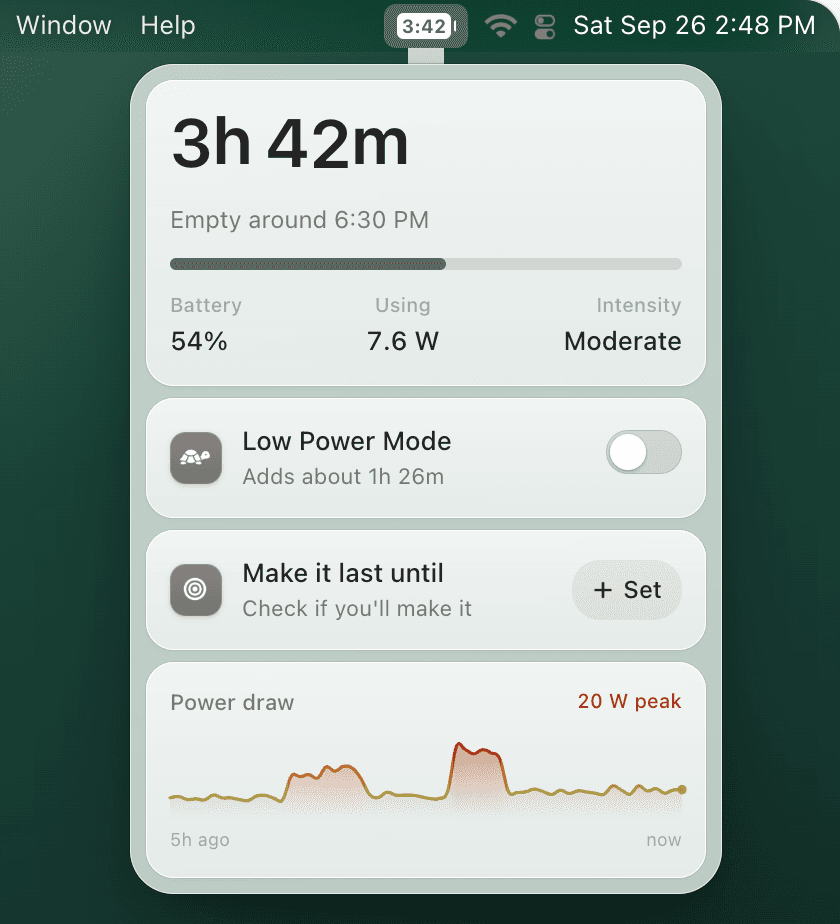
With a smaller battery, 40% can mean four hours of notes or barely one on a video call. TurtleBar puts the actual time left in the menu bar, based on what your MacBook Neo is drawing, warns you before a deadline, and turns on Low Power Mode before you run out. It is a universal app for macOS 13 or later, so it runs on the Neo.
How to make a MacBook Neo charge last longer
- Use Low Power Mode on battery: System Settings > Battery > Low Power Mode > Only on Battery. It trims performance and background work; the saving depends on what you are doing. See the Low Power Mode guide.
- Lower the brightness: the display is one of the biggest draws on light work.
- Find the apps costing you time: browsers with many tabs, video calls and anything compiling or exporting. The battery drain guide shows how to spot them.
- Keep Optimized Battery Charging on: it protects the battery's health over the years without costing you runtime today.
MacBook Neo battery FAQ
How many battery cycles is a MacBook Neo rated for?
Apple rates the MacBook Neo battery for 1,000 charge cycles. A cycle is 100% of the battery's capacity used, whether in one go or spread over several partial charges.
What is a good cycle count for a MacBook Neo?
Anything well under 1,000 is normal. Under 300 is a young battery, 300 to 700 is ordinary wear, and from about 700 it is worth watching Maximum Capacity. Past 1,000 cycles, or below 80% Maximum Capacity, plan for a replacement.
How long does the MacBook Neo battery last?
Apple quotes up to 11 hours of wireless web browsing and up to 16 hours of video streaming. In everyday use, a full charge is roughly 6h 59m of browsing or 3h 51m of video calls, depending on brightness and apps.
How long will 30% battery last on a MacBook Neo?
About 2h 6m of web browsing, 3h 18m of writing, or 1h 9m on a video call. Low Power Mode stretches the browsing figure to about 2h 37m.
Is there a battery time remaining app for MacBook Neo?
Yes. TurtleBar is a universal app for macOS 13 or later, so it runs on the MacBook Neo. It shows the time left in the menu bar, warns you before you run out, and can turn on Low Power Mode automatically.
Sources: Apple's MacBook Neo announcement and tech specs, and 9to5Mac on the cycle rating. Runtime figures are TurtleBar estimates.