Free tool
MacBook battery life calculator
How long will your battery last? Pick your MacBook, your charge and what you're doing. The same 30% can be an hour or five, depending on the work.
Estimated time left
5h 10m
Low Power Mode would add about 1h 17m.
The same 54% on this Mac
- Writing, notes, email8h 7m
- Streaming video6h 19m
- Web browsing5h 10m
- Video calls2h 50m
- Coding and builds1h 47m
- Photo or video export1h 17m
- Gaming1h 8m
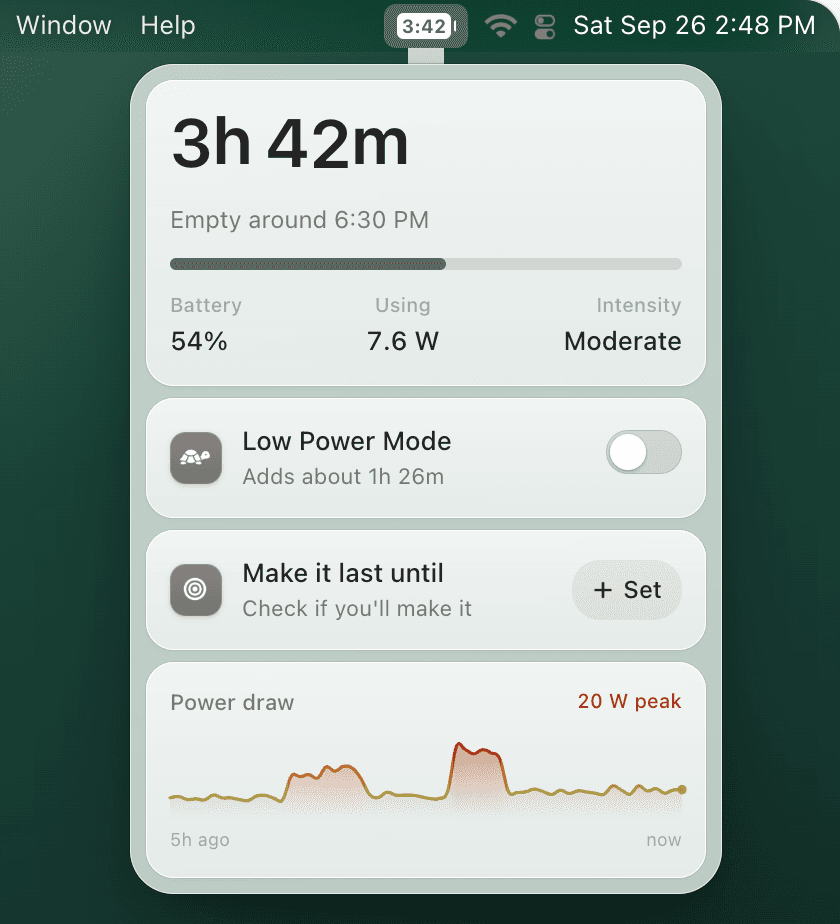
These are typical figures. TurtleBar measures your own Mac and keeps this countdown in your menu bar, live.
How long does each percentage last?
Typical time left at each charge level, for a new battery at a comfortable brightness. At 30%, a 13-inch MacBook Air has about 2h 52m of browsing left, but only 1h 35m on video calls.
| Battery | Writing, notes, email | Web browsing | Streaming video | Video calls | Coding and builds |
|---|---|---|---|---|---|
| 10% | 1h 30m | 57m | 1h 10m | 32m | 20m |
| 20% | 3h | 1h 55m | 2h 20m | 1h 3m | 39m |
| 25% | 3h 45m | 2h 23m | 2h 55m | 1h 19m | 49m |
| 30% | 4h 31m | 2h 52m | 3h 30m | 1h 35m | 59m |
| 40% | 6h 1m | 3h 50m | 4h 41m | 2h 6m | 1h 19m |
| 50% | 7h 31m | 4h 47m | 5h 51m | 2h 38m | 1h 39m |
| 60% | 9h 1m | 5h 44m | 7h 1m | 3h 9m | 1h 58m |
| 70% | 10h 31m | 6h 42m | 8h 11m | 3h 41m | 2h 18m |
| 80% | 12h 1m | 7h 39m | 9h 21m | 4h 12m | 2h 38m |
| 90% | 13h 32m | 8h 36m | 10h 31m | 4h 44m | 2h 58m |
| 100% | 15h 2m | 9h 34m | 11h 41m | 5h 16m | 3h 17m |
| Battery | Writing, notes, email | Web browsing | Streaming video | Video calls | Coding and builds |
|---|---|---|---|---|---|
| 10% | 1h 35m | 1h 1m | 1h 14m | 33m | 21m |
| 20% | 3h 11m | 2h 2m | 2h 29m | 1h 7m | 42m |
| 25% | 3h 59m | 2h 32m | 3h 6m | 1h 24m | 52m |
| 30% | 4h 46m | 3h 2m | 3h 43m | 1h 40m | 1h 3m |
| 40% | 6h 22m | 4h 3m | 4h 57m | 2h 14m | 1h 24m |
| 50% | 7h 57m | 5h 4m | 6h 11m | 2h 47m | 1h 44m |
| 60% | 9h 33m | 6h 5m | 7h 26m | 3h 20m | 2h 5m |
| 70% | 11h 8m | 7h 5m | 8h 40m | 3h 54m | 2h 26m |
| 80% | 12h 44m | 8h 6m | 9h 54m | 4h 27m | 2h 47m |
| 90% | 14h 19m | 9h 7m | 11h 8m | 5h 1m | 3h 8m |
| 100% | 15h 55m | 10h 8m | 12h 23m | 5h 34m | 3h 29m |
How the estimate works
Energy left is your battery's rated capacity in watt-hours, times its health, times the charge. Time left is that energy divided by how many watts your Mac draws. A MacBook Air 13-inch draws around 3 to 6 W for light work and 20 W or more for exports and games; Pro models and larger displays draw more.
Your Mac, measured
Typical figures are a starting point. TurtleBar reads what your own Mac is drawing, learns your day hour by hour, and keeps the answer in the menu bar as a countdown. See also how to see battery time remaining on a Mac and make a charge last longer.
Questions
How long will 30% battery last on a MacBook?
On a MacBook Air 13-inch, 30% lasts about 2h 52m of web browsing, 4h 31m of writing, or 1h 35m on video calls. On a MacBook Pro 14-inch it is about 3h 2m of browsing. It depends far more on what you are doing than on the percentage.
How long does 20% battery last on a MacBook Air?
Roughly 1h 55m of web browsing, 2h 20m of streaming video, or 1h 3m on a video call on a 13-inch MacBook Air. Turning on Low Power Mode stretches the browsing figure to about 2h 23m.
How long will 50% battery last on a MacBook Pro?
On a 14-inch MacBook Pro, 50% is about 5h 4m of browsing, 2h 47m of video calls, or 1h 44m of coding and builds. The 16-inch model's 100 Wh battery lasts longer at the same percentage.
How do I see my Mac's battery time remaining?
macOS removed the time estimate from the menu bar in 2016. You can still get a one-off estimate by typing pmset -g batt in Terminal. TurtleBar keeps a live countdown in the menu bar, based on what your Mac is actually drawing.
How much longer does Low Power Mode make a MacBook last?
It varies with the workload. For everyday use, a saving of around 20% of power is a fair middle, which this calculator uses. It helps most on light and medium work, and is felt as a slower Mac on heavy work.
How accurate is this calculator?
It multiplies your battery's rated capacity by its health and charge, then divides by a typical power draw for that model and activity. Real draw varies with brightness, apps and background work, so treat the results as a good estimate. TurtleBar measures your own Mac instead of using typical figures.
Put this guide into practice
Know how long your Mac will last.
TurtleBar puts the time your Mac has left in the menu bar, tells you if it will last until your next deadline, and turns on Low Power Mode before you run out.
- Time left, not a percentage
- Automatic Low Power Mode
- $4.99 once, 14-day refund
One-time purchase. No subscription. 14-day refund. macOS 13 Ventura or later, Apple Silicon and Intel.