Checked October 7, 2026 · By Soren Starck
How to See Battery Time Remaining on Mac
macOS no longer shows battery time remaining in the menu bar, but it still calculates it. Open Terminal and run pmset -g batt to see an estimate such as "3:42 remaining", or open Activity Monitor, click Energy and read Time remaining at the bottom. To keep it visible all the time, use a menu bar app.
Always visible
Put time remaining back in your menu bar.
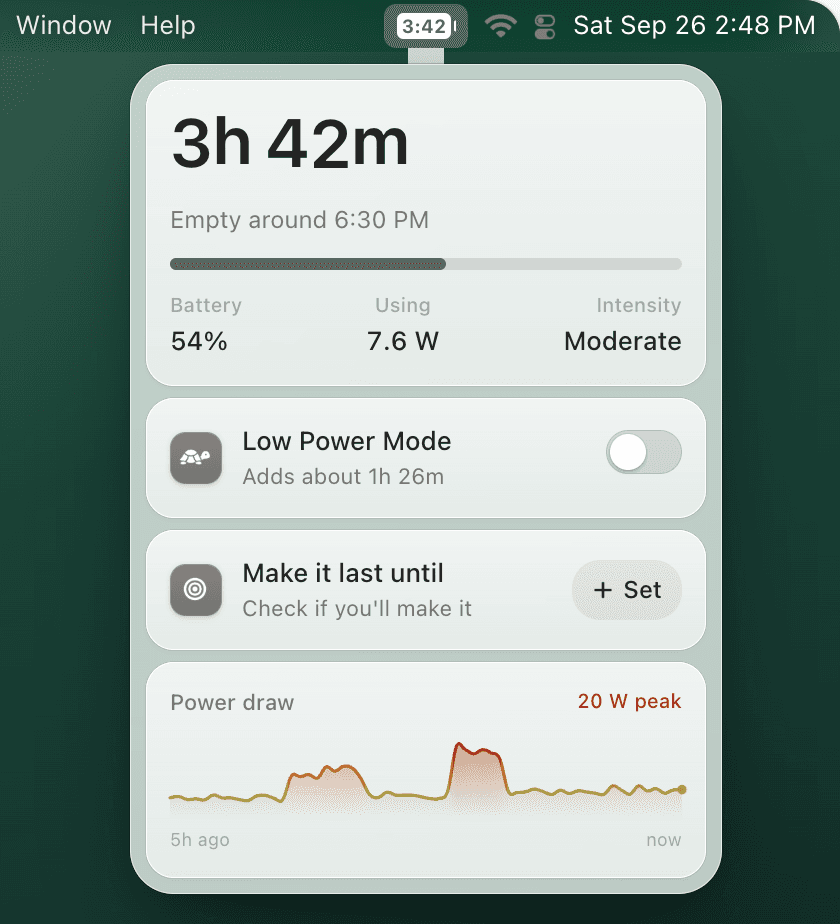
TurtleBar shows "3h 42m", or the clock time your battery will be empty, right in the menu bar. The estimate comes from your Mac's real power draw and adjusts when your workload changes. $4.99 once, no subscription, macOS 13 Ventura or later.
3 ways to see battery time remaining on Mac
| Method | Where | Always visible | Cost |
|---|---|---|---|
| pmset -g batt | Terminal | No, run it each time | Free |
| Time remaining | Activity Monitor, Energy tab | No, open the app | Free |
| Menu bar app | Menu bar, e.g. TurtleBar | Yes | $4.99 once |
1. Terminal: pmset -g batt
- Open Terminal. Press Command-Space, type Terminal and press Return.
- Run pmset -g batt. Type pmset -g batt and press Return.
- Read the estimate. The battery line shows the percentage, whether it is discharging, and the time left, for example 54%; discharging; 3:42 remaining.
Now drawing from 'Battery Power'
 -InternalBattery-0 (id=1234567)	54%; discharging; 3:42 remaining present: true
If it says (no estimate), macOS is still measuring after you unplugged or after a big change in load: wait a minute and run it again. While charging, the time shown is how long until full. The number is a snapshot of this moment's drain, so it can jump when you open or close a heavy app.
For a free command-line summary, battime is a zsh tool from the TurtleBar developer. Running battime prints one snapshot with the macOS pmset estimate, momentary power draw and battery health. TurtleBar is the paid $4.99 app for keeping battery time always visible in the menu bar.
2. Activity Monitor: Energy tab
- Open Activity Monitor from Applications > Utilities, or press Command-Space and type Activity Monitor.
- Click the Energy tab at the top of the window.
- Look at the bottom of the window: Remaining charge, Time remaining and Time on battery. Time remaining only appears while the Mac runs on battery.
The list above those numbers ranks apps by energy impact, which also answers the next question: what is draining it. For more on that, see MacBook battery usage by app.
3. In the menu bar, all the time
The macOS battery menu can only add a percentage next to the icon (how to show battery percentage). A menu bar app can put the time there instead. TurtleBar can show a countdown ("3h 42m"), the clock time it will be empty, time and percentage together, just the percentage, or only the icon, drawn inside a battery icon by default. Other options are compared in the best Mac battery apps.
Time remaining vs time on battery: what's the difference?
Time on battery is how long your Mac has been running since you last unplugged it: it counts up. Time remaining is the estimate of how much longer the current charge will last at the current rate of use: it counts down. A MacBook can show 5 hours on battery and 2 hours remaining at the same moment.
Time on battery makes a good reality check. If a full charge gave you 6 hours of time on battery yesterday, that is your real runtime for that kind of day, whatever the estimate said at 9 AM.
How long will 30% battery last on a MacBook?
It depends on what you're doing, not just the percentage. On a 13-inch MacBook Air, 30% lasts roughly 3h 50m of writing, 2 hours of browsing, 1h 10m on a video call, or about 35 minutes of video export. To estimate any Mac, multiply the battery capacity in watt-hours by the percentage left, then divide by the power draw in watts.
Hours left = capacity (Wh) × charge left ÷ power draw (W)
Example: 52.6 Wh × 30% = 15.8 Wh. Browsing at about 7.7 W: 15.8 ÷ 7.7 ≈ 2 hours.
| Charge left | Writingabout 4.1 W | Browsingabout 7.7 W | Video callabout 13.2 W | Building codeabout 19.5 W | Exporting videoabout 26 W |
|---|---|---|---|---|---|
| 20% | 2h 34m | 1h 22m | 48 min | 32 min | 24 min |
| 25% | 3h 12m | 1h 43m | 1h 00m | 40 min | 30 min |
| 30% | 3h 51m | 2h 03m | 1h 12m | 49 min | 36 min |
| 40% | 5h 08m | 2h 44m | 1h 36m | 1h 05m | 49 min |
| 50% | 6h 25m | 3h 25m | 2h 00m | 1h 21m | 1h 01m |
Estimates for a 13-inch MacBook Air with a 52.6 Wh battery, not measurements. Screen brightness and background work move them. A worn battery holds less: multiply by the Maximum Capacity shown in System Settings > Battery > Battery Health (how to check it).
MacBook Pro and 15-inch Air: the method is the same with a bigger battery. A 15-inch MacBook Air holds about 66.5 Wh, a 14-inch MacBook Pro about 70 Wh and a 16-inch about 100 Wh, so the same percentage holds more energy. Pro and Max chips can also draw more under heavy load. Plug in your own numbers in the battery life calculator, or look up your model's capacity in MacBook battery capacity.
Why a percentage doesn't tell you how long
54% on a 13-inch MacBook Air is about 28 Wh of energy. At about 4 W of writing, that is roughly 7 hours. At about 26 W of exporting video, it is roughly 1 hour. Same battery, same percentage, and one lasts about six times longer than the other. The percentage tells you how full the tank is; only the power draw tells you how far it goes.
How accurate is the time remaining estimate?
macOS works out time remaining from the current drain, so it swings when the load changes: start a video call and 5 hours can become 2 within a minute. That instability is the reason Apple gave for removing it from the menu bar in 2016. A useful estimate ignores short spikes but still follows real changes in what you're doing.
That is how TurtleBar builds its number. It reads the real power draw in watts and smooths it, adjusts within about a minute when your workload genuinely changes (showing "Adjusting" while it does), learns how much this Mac usually draws hour by hour, and puts a ~ in front of the time when it isn't confident yet.
Skip the math
Know when your Mac will be empty, not just how full it is.
- Time left and "Empty around 4:10 PM", always in the menu bar
- "Make it last until 6:00 PM": On track, Close, or Short by about 40m, with a one-click Low Power Mode fix
- The top 5 apps by watts, and how much runtime each one is costing you
- A warning when less than an hour is left, and Low Power Mode rules that switch on for you
One-time purchase · no subscription · 14-day refund · signed and notarized by Apple
When the time left isn't enough
The quickest way to add time is Low Power Mode, and the earlier you switch it on, the more it adds. The Low Power Mode guide shows how much it can add at 80%, 50% and 20%, and the automatic Low Power Mode guide shows how to have it switch on by itself when time runs short.
Frequently asked questions
Can a Mac show battery time remaining without an app?
Yes, but not in the menu bar. Run pmset -g batt in Terminal, or open Activity Monitor, click Energy and read Time remaining at the bottom. Both are snapshots you have to check by hand.
Why doesn't my Mac show battery time remaining anymore?
Apple removed it from the battery menu in macOS Sierra 10.12.2 in December 2016, saying the estimate couldn't keep up with how quickly usage changes. It has not come back in any later version of macOS.
What does time on battery mean on a MacBook?
Time on battery is how long the Mac has been running on battery since it was last unplugged. It counts up, while time remaining is an estimate that counts down to empty.
Why does pmset -g batt say (no estimate)?
macOS needs a short while to measure the drain after you unplug or after a big change in load. Wait a minute or two and run pmset -g batt again.
How long will 30% battery last on a MacBook Air?
On a 13-inch MacBook Air, 30% is roughly 2 hours of browsing, about 3h 50m of light writing, or about 1h 10m on a video call. These are estimates from its 52.6 Wh battery; brightness, apps and battery health change them.
How long will 40% battery last on a MacBook Pro?
Use capacity times percentage divided by watts. A 14-inch MacBook Pro holds about 70 Wh, so 40% is about 28 Wh: roughly 3h 40m at 7.7 W of browsing, or about 1h 25m at 20 W of heavier work.
Is the Mac's battery time estimate accurate?
It is accurate for the current rate of drain, but that rate changes all the time, so a snapshot can be off by hours after you switch tasks. Smoothing the draw over a few minutes and learning your usual pattern gives a steadier number.
Does TurtleBar work on MacBook Air and MacBook Pro?
Yes. TurtleBar runs on macOS 13 Ventura or later, on Apple Silicon and Intel MacBooks. It costs $4.99 once, with a 14-day refund.
Related guides:
Get battery time remaining back on your Mac
$4.99 once. macOS 13 Ventura or later, Apple Silicon and Intel. 14-day refund.