MacBook Losing Battery While Plugged In? Why It Happens and 10 Fixes
A MacBook loses battery while plugged in when it uses more power than the charger delivers. The usual causes are a low-wattage charger, a USB-C hub or monitor passing through less power, a worn cable, or a heavy app like a video call or a build. If the percentage holds steady near 80%, macOS is pausing charging on purpose.
Quick answer
A MacBook usually drains while plugged in because the charger, cable, dock, or monitor is supplying less power than the Mac is using. Plug directly into the correct Apple-rated charger, quit heavy apps, let the Mac cool, then check Battery Health. If it still loses charge during light work, treat it as a charging or service issue.
10 fixes for a MacBook losing battery on the charger
Fix 1
Use the right charger wattage
A 30W phone or iPad charger may run a MacBook Air lightly, but it can lose charge under load. Use the adapter wattage Apple recommends for your MacBook model.
Fix 2
Bypass docks and monitor hubs
USB-C monitors and hubs often provide less power than the Mac needs. Plug the charger directly into the Mac for one test session.
Fix 3
Swap the cable
Some USB-C cables carry data but not enough power. Try the original MagSafe/USB-C cable or a cable rated for high-wattage charging.
Fix 4
Check for heavy apps
Video calls, Chrome tabs, games, Xcode builds, virtual machines, and exports can exceed a weak power source. Activity Monitor → Energy shows the biggest drains.
Fix 5
Reduce heat
macOS may slow or pause charging when the battery is hot. Move the Mac off blankets, close demanding apps, and test again after it cools.
Fix 6
Understand Charging On Hold
If the battery is near 80% and not dropping, Optimized Battery Charging or a Charge Limit is probably holding it there on purpose. If it keeps falling, troubleshoot power delivery.
Fix 7
Check battery health
A worn or service-recommended battery can behave unpredictably. Review System Settings → Battery → Battery Health and compare cycle count.
Fix 8
Restart and update
A stuck power-management process is less common, but restarting and installing macOS updates can clear charging-status bugs.
Fix 9
Test another wall outlet
Power strips, adapters, and travel plugs can fail silently. Test a direct wall outlet before assuming the Mac is broken.
Fix 10
Book service if the correct charger still loses charge
If the Apple-rated adapter and cable cannot maintain charge during light work, the USB-C/MagSafe port, battery, or logic board may need inspection.
When the drain is normal vs a real problem
- Usually normal: the Mac is paused around 80% with Charging On Hold (or “Charged to 80% Limit”) and the percentage is stable.
- Usually a power-source problem: the percentage drops during a video call, game, external-display session, or export while using a low-wattage charger or dock.
- Potential service issue: the percentage drops during light browsing even with the correct Apple-rated adapter connected directly.
Charging or not?
See whether your Mac is really charging, and which apps are pulling the watts.
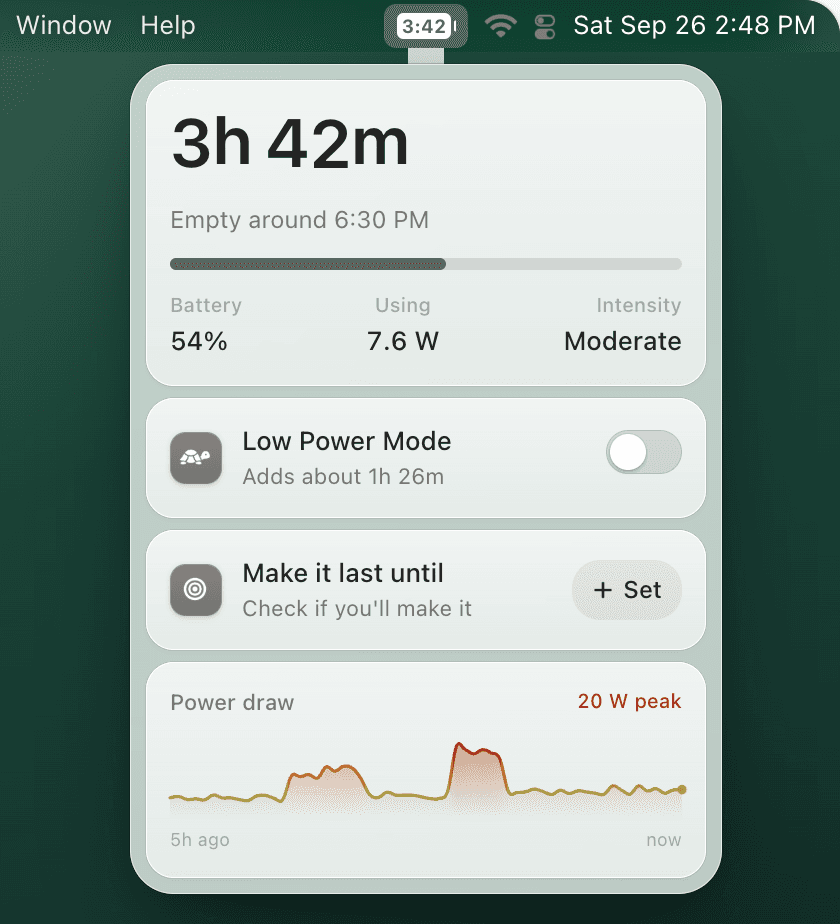
While your Mac charges, TurtleBar shows the time to full and the clock time the battery will be full. Its power and battery charts show whether the level is climbing or sliding, and its top 5 list shows which apps draw the most watts: the usual reason a small charger or hub cannot keep up. Unplug, and it switches to the time you have left.
- “Full at 5:40 PM”Time to full while the battery is charging.
- Power and battery chartsSpot the moment the level starts falling on the charger.
- Top 5 apps in wattsFind the app that outpaces your charger.
What it does not do: TurtleBar cannot fix a weak charger, cable, or port, and it does not control charging. Use the fixes above for that.
One-time purchase, no subscription. 14-day refund. macOS 13 or later, Apple Silicon and Intel.
FAQ
Why is my MacBook battery draining while plugged in?
The most common causes are an underpowered charger or USB-C hub, a damaged cable, heavy apps using more power than the adapter supplies, heat, or battery-health problems. Start by checking the charger wattage and System Settings > Battery.
Can a MacBook use more power than the charger provides?
Yes. A low-wattage USB-C charger, monitor hub, or dock can power light work but still lose percentage during video calls, games, exports, builds, or external-display use. Use the Apple-rated adapter or a charger with enough wattage for your model.
Is it bad if my MacBook says plugged in but not charging?
Not always. macOS may pause charging on purpose because of Optimized Battery Charging (Charging On Hold) or a Charge Limit you set. It becomes a problem when the percentage keeps dropping during normal work or the Mac cannot recover after using the correct adapter and cable.