Updated September 26, 2026 · By Soren Starck, who makes TurtleBar (a paid app, so the free picks below come first)
Best Free Mac Battery Apps in 2026, and What They Can't Do
For most battery jobs, free is enough. macOS itself shows percentage, Battery Health and cycle count, and on Apple silicon with macOS Tahoe 26.4 or later it has a Charge Limit. coconutBattery's free version tracks battery health over time, AlDente's free version limits charging, and Stats, which is open source, puts a battery monitor with macOS's own time estimate in the menu bar. Where free runs out is acting on your battery: none of them switches Low Power Mode by the time you have left or a time you need to reach.
Quick answer
The best free Mac battery app for each job
- Percentage, health, cycle count: macOS, already installed. Where to find each.
- Health history over months: coconutBattery, free version.
- 80% charge limit: macOS's Charge Limit on Apple silicon (Tahoe 26.4+), otherwise AlDente's free version.
- Battery monitor in the menu bar: Stats, free and open source.
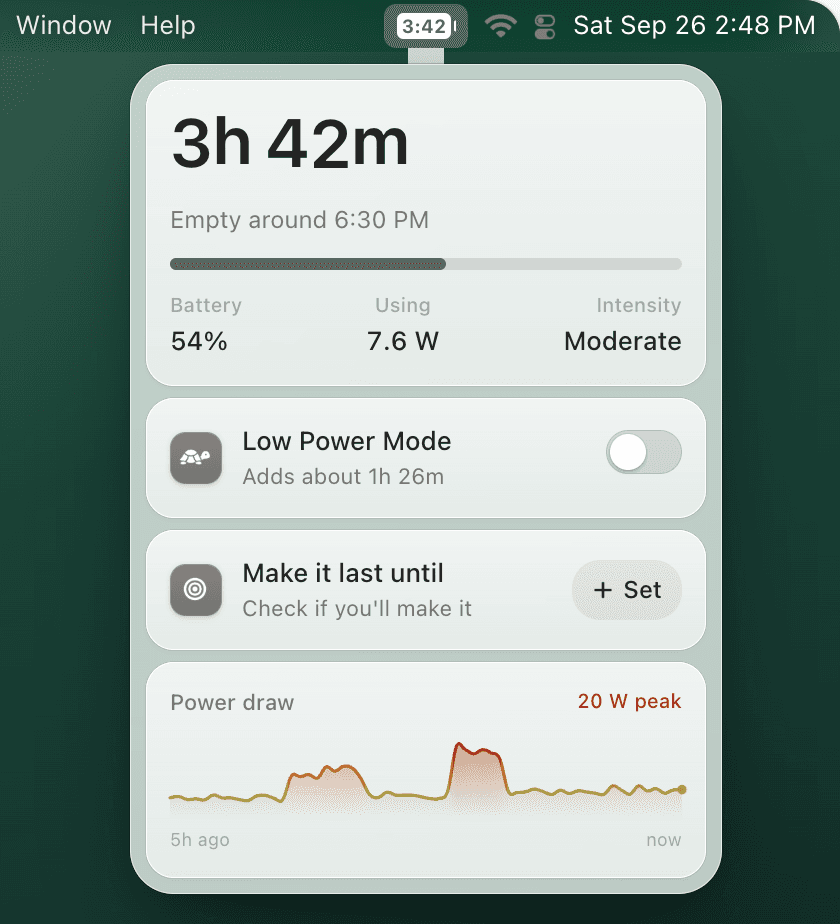
Want Low Power Mode handled for you? Free tools can't switch it by the time you have left or a deadline. TurtleBar does, as well as by charge, idle time or app, and shows how long you really have.
One-time purchase · no subscription · 14-day refund
1. macOS: the free battery app you already have
- Battery percentage: System Settings → Control Center → Battery → Show Percentage. Steps: show battery percentage on Mac.
- Battery Health and maximum capacity: System Settings → Battery, then the info button next to Battery Health.
- Cycle count: hold Option, open the Apple menu → System Information → Power. What's normal: MacBook cycle count guide.
- Charge Limit: System Settings → Battery, then the info button next to Charging. Apple silicon with macOS Tahoe 26.4 or later, 80% to 100%.
- Low Power Mode: in Battery settings, always on, off, or whenever you're on battery.
- Which apps use energy: Activity Monitor → Energy tab.
The gap is time. Apple removed the time-remaining estimate from the menu bar in 2016, and it's now only in Terminal: type pmset -g batt for a one-off reading. See every way to see battery time remaining on Mac.
2. coconutBattery: best free battery health app
Is coconutBattery free? Yes, for what most people need. The free version shows your Mac's battery details, including current capacity against design capacity and the cycle count, saves health readings so you can watch wear over time, reads iPhone and iPad batteries, and has a menu bar item. coconutBattery Plus, a one-time purchase, adds Wi-Fi reading of iOS devices, a lifetime analyzer with temperature and voltage data, and threshold notifications. It needs macOS 12 Monterey or later.
3. AlDente: free charge limiter
AlDente has a free version that stops charging at a level you choose, so a MacBook that lives on a desk isn't held at 100%. AlDente Pro is sold as a yearly subscription or a lifetime license; the developer's pricing page compares the two. The developer lists macOS 12 Monterey through macOS 26 Tahoe, on Intel MacBooks from 2013 as well as Apple silicon. On an Apple silicon Mac with macOS Tahoe 26.4 or later, try the built-in Charge Limit first: it may be all you need.
4. Stats: best free battery monitor for the menu bar
Stats is free and open source (MIT license) and runs on macOS 12 Monterey or later. Its battery module can put the level in the menu bar with the time remaining beside it, and its popup shows health, cycle count, battery temperature, power in watts, time to charge or discharge and the top processes. It can notify you at a low or high battery level. It also monitors CPU, GPU, memory, disks, network, sensors and Bluetooth devices, so it doubles as a free iStat Menus alternative.
Two limits to know: its time remaining is the raw estimate macOS calculates, which moves with every change in load, and it doesn't switch Low Power Mode.
5. Battery Toolkit: free, but archived
Battery Toolkit is a free, open-source charge limiter for Apple silicon Macs. Its GitHub repository is now archived and read-only, so it won't be fixed for future macOS versions. Since it only ran on Apple silicon, macOS's own Charge Limit (Tahoe 26.4 or later) is the natural free replacement.
Free Mac battery apps at a glance
| Free tool | Best free job | In the menu bar | Limits |
|---|---|---|---|
| macOS built in | Percentage, Battery Health, cycle count, Low Power Mode, and a Charge Limit on Apple silicon with Tahoe 26.4+ | Percentage | No time left in the menu bar; Low Power Mode is always, never or whenever on battery |
| coconutBattery | Battery health and saved history, plus iPhone and iPad batteries | Battery details | Wi-Fi reading, the lifetime analyzer and notifications need Plus |
| AlDente | Charge limiting while plugged in | Icon and popup | Pro is a yearly or lifetime license |
| Stats | Open-source system monitor with a detailed battery module | Battery level, optional time left | Time left is macOS's raw estimate; no Low Power Mode control |
| Battery Toolkit | Charge limiting on Apple silicon | Menu bar controls | Archived on GitHub, so no more updates |
Checked on each developer's site or source code on September 26, 2026.
Where free runs out
Free tools report on your battery. TurtleBar acts on it.
Free (macOS, Stats)
- • macOS's raw time estimate, which jumps with every spike in load.
- • Low Power Mode always, never, or whenever on battery.
- • Top processes, or Energy Impact in Activity Monitor.
- • A warning at a battery percentage.
TurtleBar, $4.99 once
- • A smoothed estimate that learns your Mac's day, as a countdown or the time it will be empty.
- • Low Power Mode on by charge, time left, a deadline, idle time or app, and off when you plug in.
- • What Low Power Mode would add, and whether you'll make it to the time you set.
- • The five apps costing you the most, in watts and in runtime.
Is there a free version of TurtleBar?
No, and there's no subscription either. TurtleBar is $4.99 once, from one indie developer. If it isn't for you, email within 14 days and you get your money back. It needs macOS 13 Ventura or later, runs on Apple Silicon and Intel, is about 7 MB, and is signed and notarized by Apple. Your battery data never leaves your Mac.
Free Mac battery checklist
- Turn on battery percentage in Control Center settings.
- Check Battery Health before you think about replacing the battery.
- Check the cycle count in System Information, not on a random download site.
- If your Mac stays plugged in, set a charge limit.
- Use Low Power Mode when you need the battery to last.
- Pay only for a job macOS and the free apps don't do.
Frequently asked questions
What is the best free Mac battery app?
Start with macOS itself: it shows percentage, Battery Health and cycle count, and on Apple silicon with macOS Tahoe 26.4 or later it has a Charge Limit. For a health history, coconutBattery's free version. For a charge limiter on older macOS or Intel, AlDente's free version. For a free menu bar monitor, Stats, which is open source.
Is coconutBattery free?
Yes. The free version covers Mac and iPhone or iPad battery diagnostics, saved health readings and a menu bar item. coconutBattery Plus, a one-time purchase, adds reading iOS devices over Wi-Fi, a lifetime analyzer with temperature and voltage data, and threshold notifications.
Is AlDente free?
There is a free version of AlDente, and a paid AlDente Pro sold as a yearly subscription or a lifetime license. If you have an Apple silicon Mac on macOS Tahoe 26.4 or later, the Charge Limit built into macOS may already be all you need.
Is there a free app that shows battery time remaining on Mac?
Yes. Stats, a free open-source monitor, can show time remaining next to its battery icon. It is the raw estimate macOS calculates, the same one Terminal's pmset -g batt prints, so it moves with every change in load. TurtleBar's estimate is smoothed and learns your Mac's usage, and it acts on it with Low Power Mode.
Is there a free version of TurtleBar?
No. TurtleBar is $4.99 once, with no subscription. If it isn't for you, email within 14 days for a full refund.
Should I pay for a Mac battery app?
Only for a job free tools don't do. Health checks, percentages and charge limits are covered for free. Paying makes sense if you want Low Power Mode switched on for you by time left, a deadline, idle time or app, and a time-left estimate steady enough to plan around.
Related guides
- Best Mac battery apps compared, free and paid
- Mac battery menu bar app: time left, not just percentage
- MacBook battery health guide
- MacBook 80% charge limit
- AlDente alternatives
When free isn't enough: $4.99, once
Time left you can plan around, and Low Power Mode switched on before you run short. 14-day refund.
"Clean, useful, no fluff. Exactly my kind of Mac utility."